Evil Twin Attacks: Rogue Clone Wi-Fi & How to Stay Safe
How evil twin access points clone a real network to capture traffic and credentials, why they fool devices, and how to defend on public Wi-Fi.
Your phone joins the coffee shop Wi-Fi the moment you walk in, without asking. That convenience is exactly what an evil twin attack abuses. An attacker stands up a wireless access point with the same name as a network your device already trusts, and your device connects to the attacker's hardware instead of the real one. From that point, the attacker is in the middle of everything you do online.
Evil twin attacks are cheap, quiet, and effective against anyone who relies on public Wi-Fi. This guide explains how the clone fools your device, what the attacker can do once you connect, and the specific habits and controls that neutralize it.
What an evil twin is
An evil twin is a rogue access point configured to impersonate a legitimate one. Wi-Fi networks identify themselves by a human-readable name, the SSID, such as CoffeeShop_Guest. There is nothing stopping two access points from broadcasting the same SSID. Your device chooses between them based on signal strength and stored preferences, not on any proof of identity.
The attacker sets up an access point broadcasting the target SSID, often on hardware as small as a phone or a pocket-sized device. To make the clone convincing they may also:
- Copy the MAC address (BSSID) of the real access point so basic checks match.
- Reproduce the captive portal, the login or terms-of-service page many public networks show.
- Provide a working internet connection through the attacker's own uplink, so nothing seems wrong.
That last detail is what makes the attack hard to notice. Your browsing works normally. The pages load. The only difference is that every packet now passes through the attacker first.
Why your device falls for it
Two behaviors do most of the work for the attacker.
Auto-reconnect. To save you from re-entering network details, devices remember networks by SSID and rejoin them automatically. Your phone does not distinguish "the CoffeeShop_Guest I used last week" from "a network calling itself CoffeeShop_Guest right now". If the attacker's clone is present and has the strongest signal, your device may connect to it on its own.
Signal preference. When two access points share an SSID, devices generally prefer the stronger signal. An attacker positioned close to the victim, or transmitting at higher power, becomes the preferred access point.
Attackers often combine the evil twin with a deauthentication attack to speed things up. A burst of forged deauth frames knocks victims off the real access point, and their devices reconnect, at which point the stronger clone wins. The deauth is the push; the evil twin is the landing spot. Our deauthentication attacks guide covers that forced-disconnect step in detail.
What the attacker gains
Once you connect to the evil twin, the attacker holds the network position of your gateway. Everything you send outbound passes through their equipment. This is a textbook adversary-in-the-middle position, MITRE ATT&CK T1557, which carries a dedicated sub-technique for this attack, T1557.004 Evil Twin. It opens several avenues.
| Capability | What it means for the victim |
|---|---|
| Traffic interception | The attacker can read any traffic that is not encrypted end to end, including data sent over plain HTTP |
| Credential harvesting | A fake captive portal or spoofed login page can ask for a password, email, or payment details that go straight to the attacker |
| DNS and content manipulation | The attacker can redirect domain lookups, serving fake versions of sites or downgrade prompts |
| Session and cookie theft | Unprotected session tokens crossing the network can be captured and reused |
The credential-harvesting path is often the point. Many evil twin kits present a polished captive portal that mimics the venue's branding and asks the user to "log in with email" or "confirm your account". Because captive portals are a normal part of public Wi-Fi, users are conditioned to comply.
When you connect through an evil twin, the attacker controls the network but still cannot silently read traffic protected by valid HTTPS, because the browser verifies the site's certificate. This is why a browser certificate warning on a public network deserves real attention. It can be the one visible sign that something is intercepting your connection. Never click through a certificate error on Wi-Fi you do not control.
The related rogue access point problem
An evil twin is one species of rogue access point: an unauthorized access point that should not be there. The evil twin is the malicious, impersonating variety aimed at users. Other rogue access points are unauthorized devices plugged into a corporate network by an insider or attacker to create a hidden entry point. The defenses overlap, and a wireless intrusion detection system that hunts for one tends to catch the other. See our rogue access point guide for the enterprise side of this.
How to defend against evil twin attacks
The defenses split by who you are: a user on someone else's Wi-Fi, or an operator running a network.
For users on public or untrusted Wi-Fi:
- Use a VPN. A VPN wraps all your traffic in an encrypted tunnel to a server you trust, so even an attacker who controls the local network sees only ciphertext. This is the most reliable single defense on public Wi-Fi.
- Turn off auto-connect. Disable automatic joining of open and remembered networks, and forget networks you no longer use. This removes the silent-reconnect path the attacker relies on.
- Verify HTTPS and heed certificate warnings. Check that sensitive sites load over HTTPS, and never dismiss a certificate error on a network you do not control.
- Be suspicious of captive portals asking for real credentials. A legitimate guest network rarely needs your email password or payment card to grant access. Treat such prompts as phishing.
- Prefer cellular for sensitive tasks. For banking or account changes, a mobile data connection avoids the local-network attacker entirely.
A VPN only helps on a hostile network if everything is going through it. Our leak test runs live checks from your browser on the connection you are using right now: the exit IP the internet sees, WebRTC ICE candidates that can reveal your real address, whether IPv6 is escaping the tunnel, and whether your timezone and browser locale match where you appear to be. Run it once with the tunnel off and once with it on, and the difference tells you what a local attacker would still see.
For operators of a network:
- Deploy 802.1X with server-certificate validation, and prefer WPA3-Enterprise. The protection comes from the client checking the authentication server's certificate against a pinned CA and an expected server name. A clone cannot present a certificate that passes that check, so the connection fails. WPA3-Enterprise makes server-certificate validation mandatory, and its optional 192-bit mode allows only EAP-TLS with 3072-bit RSA or P-384 keys. WPA2-Enterprise left validation to client configuration, which is why toolkits such as eaphammer and hostapd-wpe still harvest PEAP-MSCHAPv2 credentials from devices configured to trust whatever certificate is offered. Push the validation setting by policy rather than trusting users to set it.
- Run a wireless intrusion detection system. A WIDS flags a second access point broadcasting your SSID or a duplicate BSSID, surfacing an evil twin near your premises.
- Educate users about your captive portal. Tell staff and guests exactly what your real portal asks for, so an imposter portal that asks for more stands out.
For a wider look at how attackers stage follow-on payloads once they have a foothold, see our reference on exploit intelligence, which tracks the vulnerabilities most likely to be weaponized next.
An evil twin works because Wi-Fi identifies networks by an easily copied name and devices connect on trust. Take away that trust: verify identity with certificates on networks you run, and assume every public network could be an imposter by tunneling through a VPN and insisting on HTTPS. Do that, and connecting to the wrong access point stops meaning connecting to the attacker.
A step-by-step walkthrough of the attack
Seeing the attack as a sequence of stages clarifies where each defense breaks the chain. A typical evil twin operation moves through five stages, and each one depends on the previous succeeding.
The first stage is reconnaissance. The attacker sits within range of the target venue and listens to the wireless traffic around them. Access points constantly broadcast beacon frames that announce their SSID, their channel, their supported security modes, and their BSSID, the hardware MAC address of the radio. Client devices also emit probe requests that name the networks they remember. From a few minutes of passive listening the attacker learns the exact SSID to clone, the channel it uses, and often a list of client devices actively looking for that name.
The second stage is cloning. The attacker configures their own access point to broadcast the same SSID as the target, and frequently the same BSSID, so that simple identity checks match. If the real network shows a captive portal, the attacker recreates it, copying the venue's branding down to the logo and colour scheme. At this point there are two access points on the air claiming to be the same network, and nothing in the Wi-Fi protocol lets a client tell the legitimate one from the clone by name alone.
The third stage is displacement, moving victims from the real access point to the clone. Devices already connected to the genuine network will not switch on their own while their existing connection is healthy, so the attacker gives them a reason. A burst of forged deauthentication frames tells victim devices they have been disconnected from the real access point. The devices, following the protocol, drop the connection and immediately try to reconnect to the remembered SSID. Because the attacker's clone is closer or transmitting at higher power, it presents the strongest signal, and the device reconnects to the clone. Our deauthentication attacks guide covers this forced-disconnect step in depth.
The fourth stage is interception. With the victim now associated to the attacker's access point, the attacker occupies the position of the victim's gateway to the internet. Every outbound packet passes through attacker-controlled equipment before it reaches its destination, and every inbound packet returns the same way. If the attacker supplies a working uplink, the victim's browsing continues normally and nothing feels wrong.
The fifth stage is exploitation, doing something with the intercepted position. The attacker may present a phishing captive portal that asks for an email password or payment details, read any traffic that is not encrypted end to end, attempt to downgrade connections from HTTPS to HTTP, or manipulate DNS responses to redirect the victim to fake sites. The specific action varies, and the common thread is that all of it depends on the victim having connected to the clone in the first place.
Detection signals: spotting an evil twin
Both users and network operators can watch for concrete indicators that a clone is present. None is conclusive on its own, and several together are a strong sign.
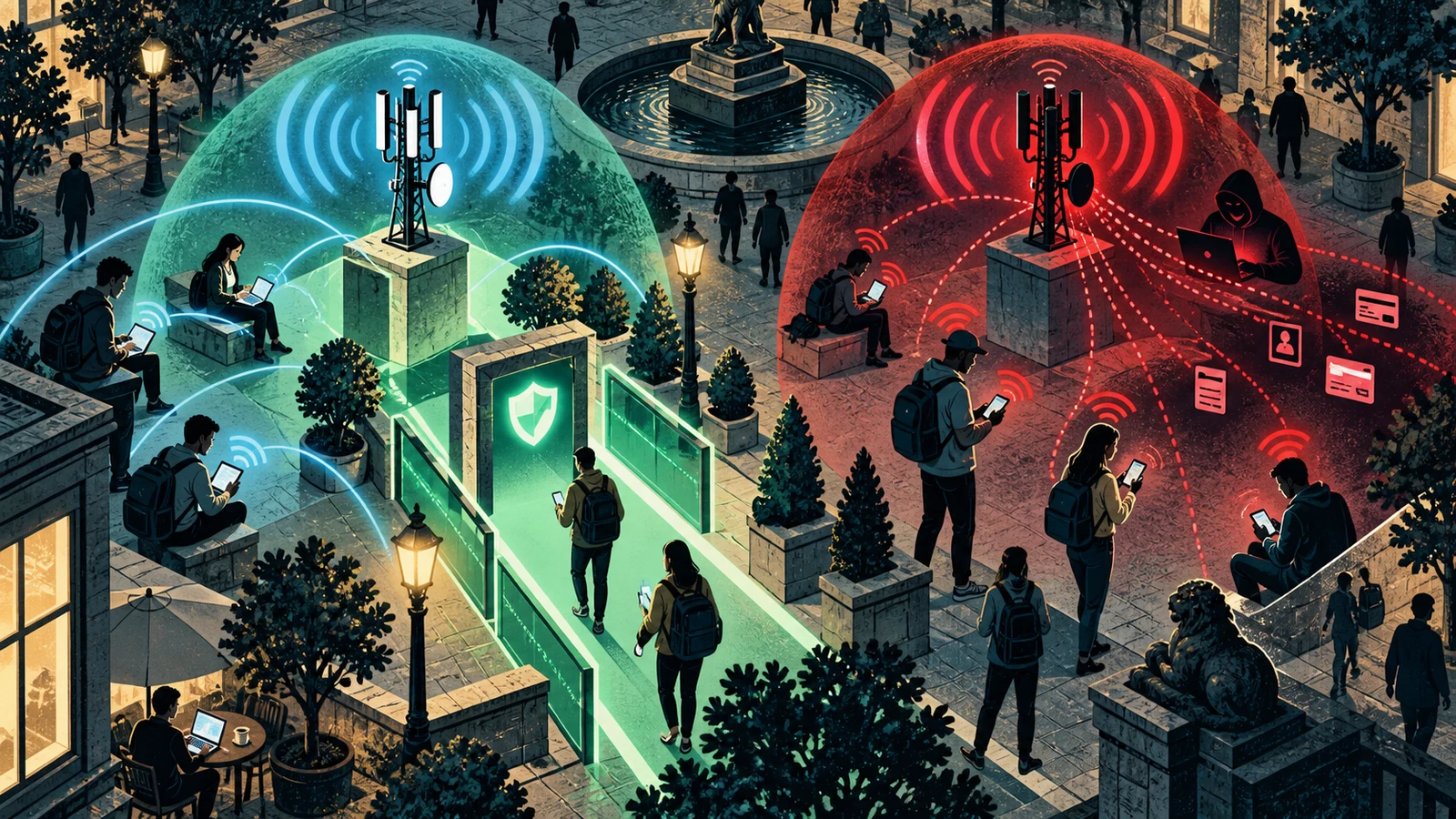
Two access points with the same SSID but different signal characteristics is the classic tell. A wireless scanner that shows the same network name appearing twice, especially with two different BSSIDs or wildly different signal strengths from the same spot, suggests one of them is not the real network.
A sudden disconnection followed by an automatic reconnect is worth noticing on public Wi-Fi. Deauthentication floods are noisy, and a device that keeps dropping and rejoining a network without an obvious cause may be caught between a real access point and a clone fighting over it.
An unexpected captive portal, or a familiar one asking for more than usual, is a red flag. A guest network that previously granted access with a single click but now demands an email password or a payment card has either changed, or is being impersonated.
A certificate warning on a site that normally loads cleanly deserves full attention. If a browser suddenly reports that a site's certificate is invalid on a network you do not control, an attacker may be attempting to intercept an otherwise encrypted connection.
For operators, a wireless intrusion detection system watches the air continuously and flags a second radio broadcasting an authorised SSID or duplicating a known BSSID. It can also detect the deauthentication floods that usually accompany the attack, since a spike in deauth frames is itself abnormal.
Two access points legitimately sharing an SSID in a large venue is normal, because that is how enterprise networks provide coverage. Two access points sharing both an SSID and the exact same BSSID is not normal, because a BSSID is meant to be a unique hardware address. A cloned BSSID appearing from a new location is one of the cleaner signals that an evil twin is on the air.
Evil twin compared with related Wi-Fi attacks
The evil twin sits among a family of wireless attacks that are easy to confuse. Separating them clarifies what defends against which.
| Attack | What it does | Primary defense |
|---|---|---|
| Evil twin | Clones a trusted SSID so victims connect to the attacker | VPN, certificate validation, disable auto-connect |
| Rogue access point | An unauthorised access point added to a network for backdoor access | Wireless intrusion detection, port security |
| Deauthentication attack | Forces devices off a real access point with forged frames | Protected management frames (802.11w), mandatory under WPA3 |
| Karma attack | Answers any probe request, posing as every remembered network | Disable auto-connect, remove saved open networks |
| Man-in-the-middle | Intercepts and relays traffic between two parties | End-to-end encryption, HTTPS, VPN |
Two of these deserve a direct contrast. A rogue access point is any unauthorised access point, and its typical goal is to create a hidden entry point into a network, often planted by an insider. An evil twin is a specific kind of rogue access point aimed at users, impersonating a trusted network to capture their traffic. The defenses overlap, and a wireless intrusion detection system built to find one usually catches the other. A karma attack is a close cousin of the evil twin that generalises the trick: instead of cloning one known network, it listens for any probe request and answers as whatever network the device is looking for, so a device probing for a remembered home or office network gets a matching impostor.
Common mistakes and misconceptions
Several assumptions leave people more exposed to evil twins than they realise.
The password protects me, so a network with a password is safe. On a shared-key network the password is known to everyone who uses the network, including an attacker who can then stand up a clone with the same credentials. A pre-shared key limits who can join, and it does not by itself prove the access point is the real one.
The little padlock in the address bar means the connection is fully safe. HTTPS protects the confidentiality and integrity of traffic to a specific site, and it does a great deal. It does not tell you the network itself is trustworthy, and it does not protect any traffic that is not sent over HTTPS. Treating the padlock as a verdict on the whole network is a mistake.
A VPN is only for privacy from advertisers. On untrusted Wi-Fi a VPN is a security control, because it wraps all traffic in an encrypted tunnel to a server you trust, so an attacker controlling the local network sees only ciphertext. That is the single most effective habit on public Wi-Fi.
Evil twins require expensive or specialised gear. The hardware can be as small as a phone or a pocket-sized device, and the software is freely available. The low cost is exactly why the attack is common in airports, hotels, cafes, and conferences.
Hidden networks are safe from cloning. Hiding an SSID stops it from broadcasting in beacons, and devices configured to use it then actively probe for it by name, which announces the name to any listener. A hidden network can be cloned as easily as a visible one, and the probing can make client devices even easier to target.
How evil twin attacks evolved
The evil twin is as old as widely available Wi-Fi, and it has stayed effective because the underlying weakness has been slow to change. Early wireless networks identified themselves purely by SSID, with no way for a client to verify that an access point was genuine, so cloning a name was always possible. As open public hotspots spread through cafes, airports, and hotels, the pool of targets grew, and captive portals gave attackers a natural template to imitate for credential harvesting.
The tooling matured alongside. What once required a laptop and manual configuration became packaged into small, cheap, purpose-built devices and easy software that automates the reconnaissance, cloning, and deauthentication steps in one flow. That automation lowered the skill needed and made the attack routine at crowded venues.
The defensive side has moved too, though more slowly. Protected management frames were defined by the 802.11w amendment in 2009 and were optional under WPA2; WPA3 makes them mandatory. They authenticate deauthentication and disassociation frames, which raises the cost of the forced-disconnect step evil twins rely on to displace victims. They do not remove that step. Beacon frames stay unprotected, and Schepers, Ranganathan and Vanhoef showed at ACM WiSec 2022, in "On the Robustness of Wi-Fi Deauthentication Countermeasures", that the rules for handling robust management frames contain unspecified and contradictory cases that still allow clients to be knocked off a network with protected management frames enabled. Treat WPA3 as raising the bar on displacement rather than closing it.
Enterprise Wi-Fi using 802.1X with server-certificate validation gives clients a way to verify the network's identity through a certificate a clone cannot forge, which is the closest thing to a real fix for the impersonation problem. Open public Wi-Fi is the gap that remains. Enhanced Open, the Wi-Fi Alliance certification for Opportunistic Wireless Encryption introduced in 2018, encrypts an open network using an unauthenticated Diffie-Hellman exchange, which stops passive eavesdropping by others on the same hotspot. The access point holds no certificate under OWE, so its identity is never established and an evil twin broadcasting an OWE network of the same name works as well as it ever did. With no shared secret and no certificate to check, user-side habits like a VPN and HTTPS carry the defense on open networks.
Frequently asked questions
How can I tell if I am connected to an evil twin? There is rarely a single obvious sign, because a well-run clone makes browsing feel normal. Watch for a network name appearing twice in a scanner, repeated unexplained disconnects and reconnects, a captive portal asking for credentials it never used to, or a certificate warning on a site that normally loads cleanly. Any of these on a public network is a reason to disconnect and switch to cellular.
Does a VPN fully protect me on public Wi-Fi? A VPN is the strongest single control, because it encrypts all your traffic to a server you trust, so an attacker controlling the local network sees only ciphertext. It does not protect the moments before the tunnel connects, and it does not help if you enter credentials into a phishing captive portal, so combine it with disabling auto-connect and being wary of portals that ask for real passwords.
Is a password-protected Wi-Fi network safe from evil twins? Not by itself. On a network with a shared password, everyone who uses it knows the password, including an attacker who can clone the network with the same credentials. A password controls who can join, and it does not prove that the access point you joined is the legitimate one. Enterprise networks with per-user credentials and server-certificate validation are the version that resists cloning.
What is the difference between an evil twin and a rogue access point? A rogue access point is any unauthorised access point, and a common goal is to create a hidden backdoor into a network. An evil twin is a specific rogue access point that impersonates a trusted network to lure users and intercept their traffic. Every evil twin is a rogue access point, and not every rogue access point is an evil twin.
Why does my phone connect to these networks automatically? Devices remember networks by SSID and rejoin them automatically to save you from re-entering details. Your phone cannot distinguish the real network you used before from a clone broadcasting the same name right now, so if the clone is present and strongest, the phone may connect to it on its own. Turning off auto-connect and forgetting old networks removes this path.
Can HTTPS alone keep me safe on an evil twin? HTTPS protects traffic to sites that use it, and it is a major reason an attacker cannot silently read everything you do. It does not protect traffic that is not sent over HTTPS, it does not stop you from being phished by a fake login page, and it is not a verdict on whether the network is trustworthy. Use it together with a VPN and healthy suspicion of credential prompts.
How do businesses stop evil twins on their own networks? The strongest control is 802.1X with server-certificate validation, which lets clients verify the network's identity through a certificate a clone cannot present. It only holds if clients are configured to validate that certificate against a pinned CA and server name; WPA3-Enterprise makes the validation mandatory, while WPA2-Enterprise deployments that left it to the user are the ones evil twin credential-stealing toolkits target. A wireless intrusion detection system that flags duplicate SSIDs, cloned BSSIDs, and deauthentication floods adds monitoring, and educating users about exactly what the real captive portal asks for helps an impostor portal stand out.
Related guides
Sources & further reading
- MITRE ATT&CK: Adversary-in-the-Middle (T1557) (MITRE)
- CISA: Securing Wireless Networks (CISA)
- Wi-Fi Alliance: Security (WPA3-Enterprise) (Wi-Fi Alliance)
- MITRE ATT&CK: Adversary-in-the-Middle: Evil Twin (T1557.004) (MITRE)
- On the Robustness of Wi-Fi Deauthentication Countermeasures (WiSec 2022) (Schepers, Ranganathan and Vanhoef, ACM WiSec)
- Wi-Fi CERTIFIED Enhanced Open: transparent Wi-Fi protections without complexity (Wi-Fi Alliance)